Showing posts with label iPad. Show all posts

Monday, November 12, 2012

Apple iPad mini TV ads


Apple's iPad mini is providing a tough competition to Google Nexus and other 7" tablets. Mini version of iPad has the functionality, ease of access and power of the big bro iPad, but at a lesser price. So undoubtedly it got out of the stock, but its not new thing for Apple. Last week they announced that they have sold 3 million iPad (both mini and iPad) in a single weekend.

Here are some TV advertisements of iPad mini.


Monday, November 5, 2012

Apple Sold 3 Million New iPads in a Weekend


Demand for the iPad mini have succeeded the initial supplies, but that's not a new figure for Apple. Its again, the same as that with iPhone and iPad, all gen.  

Apple announced Monday that it sold three million iPad minis and fourth-generation iPads in the first three days that the two new iPads were available.

The company says that this is double the previous record of 1.5 million Wi-Fi-only iPads that were sold in March when the the third-generation iPad initially went on sale. Unfortunately, Apple does not delineate how many iPad minis and fourth-generation iPads it sold, but lumps them all together in the three million figure.

The iPad mini was announced on October 23rd with pre-orders going live on the 26th. Pre-orders for the highly anticipated device quickly sold out, with wait times stretching out to two weeks or more. 

“Customers around the world love the new iPad mini and fourth generation iPad,” said Tim Cook, Apple’s CEO. “We set a new launch weekend record and practically sold out of iPad minis. We’re working hard to build more quickly to meet the incredible demand.”

Courtesy: The Verge, Mashable

Apple's tablet market falls to 50.4%


The old Silicon Valley joke, which claimed that “there is no tablet market, only an iPad market,” is obviously no longer true. 
Apple‘s tablet market share has dropped to 50.4% in Q3 2012, down from 59.7% in the same period last year, IDC’s latest report reveals.
Samsung, on the other hand, has experienced huge growth, jumping from 6.5% to 18.4% in that same period. Amazon holds the third place with 9%, followed by Asus with 8.6% and Lenovo with 1.4%.
According to IDC’s numbers, Samsung shipped 5.1 million tablets worldwide in 3Q12, up 115% from 2Q12 and 325% from 3Q11.
Amazon is in good position because rapidly expanding Kindle Fire lineup has helped it double its market share quarter-over-quarter.


Tuesday, October 23, 2012

iPad mini event will be streamed live to Apple TVs


Apple will stream a live video feed from today's iPad mini keynote directly to Apple TVs. Users with an Apple TV should see a new "Apple events" icon on their homescreen.

Clicking on the icon will take you to a page inviting you to tune in at 10 AM Pacific time to watch the event live. First noticed by MacRumors, the decision marks a u-turn for Apple, which hasn't broadcast live video from an event since 2010.

There are a lot of sites which are offering Liveblogs for this event. Some of them are:

  1. Engadget 
  2. The Verge
  3. Techno Buffalo
  4. CNET

Thursday, October 18, 2012

Apple loses UK Galaxy Tab design appeal


It seems that Samsung has got some relief in case of Suit for Galaxy Tab by Apple. 

Apple has lost its appeal in the UK regarding the High Court of Justice’s ruling that Samsung’s tablets did not infringe the iPad. The smartphone maker has now been ordered by Judge Kitchin to run a public apology stating that Samsung did not infringe its design. In an amusing twist, Reuters reports that the font size for the acknowledgement must be "no smaller than Arial 14."
Judge Colin Birss noted in July that Samsung’s tablets "were not as cool," stating that the designs didn't have "the same understated and extreme simplicity." The judge in the case also ruled that Apple would have to run advertisements on its website and in UK newspapers declaring that Samsung did not copy its designs. That motion was stayed, however, following today’s appeal.

Courtesy: The Verge

Wednesday, September 12, 2012

Join Apple on unveiling new iPhone and iPad


The family portrait you see above is likely what Apple’s mobile lineup will look like on retail shelves around the world this holiday season. Apple is gearing up for one of the biggest ever periods in technology, and it’ll need all the ammo at its insanely wealthy disposal if it wants to keep up.
The company will have papa iPad, the much rumored mama iPad mini, and the all-important iPhone 5, which we’ll know about at today’s event. The landscape is moving toward the 7-inch tablet range right now; they’re ultra-portable, lighter, and a bit easier to wield than larger alternatives. The render above is designed to give scale and demonstrate how the devices will look alongside each other.
It’s a pretty handsome looking lineup, one that’ll come up against devices like the Samsung Galaxy Note II, Nexus 7 and Microsoft Surface during the next few months. It’ll be mighty interesting to see if this model family is still at the top of the heap when 2013 rolls around.
Watch iPhone 5 live event: 

Friday, August 24, 2012

Faster Facebook for iOS

If you’re one of the millions of people using Facebook’s main iOS application, you already know it’s horrendously slow.
The app’s performance up to now has been embarrassing, considering Facebook is the most installed iOS application in the entire world. Slogging through the feed was sluggish. Photos took forever to load. Even the basic action of opening the app itself took longer than other apps.
Facebook has answered the pleas of millions of mobile users with the release of a new application for iOS. The social network has finally addressed the most glaring issue of the company’s iPhone and iPad applications: speed.

Facebook acknowledges as much. “People have different expectations when it comes to using Facebook for iOS,” Mick Johnson, Facebook iOS mobile product manager, told me in an interview this morning. “They expect a level of performance and speed that just wasn’t there.”

Part of the reason behind the slowness was the old app’s reliance on HTML5. While HTML5 is a great way to build cross-platform, mobile-friendly apps and web pages, it’s not as fast for certain types of applications.

In June, two Facebook developers told The New York Times that they were working on rebuilding the iOS app in Objective-C and that the resulting app could be 2.5 times faster.For iPad users, Timeline is finally supported on the device. We have to say, it looks great on the retina screen!

Download: Facebook for iOS


Screenshots


Monday, June 11, 2012

Mac OS X Mountain Lion 15 new features

Apple announced on Monday during its 23rd annual Worldwide Developers Conference that OS X Mountain Lion, the latest upgrade to its core Mac software, will be getting a series of enhancements.
Apple exec Craig Federrichi demoed various Mountain Lion features for attendees, highlighting Siri-like dictation, a Power Nap feature which updates your streams while the Mac sleeps and a tabview feature associated with the Safari browser, which allows you to zoom in and out. It will also get deeper integration with iCloud.
Mountain Lion will ship in July and cost $19.99. It will also serve as an upgrade to Snow Leopard.

Apple OS X Mountain Lion: 15 New Features

1. Deeper Integration With iCloud

Today, Apple's iCloud technology syncs media (music, photos) and some data among iPhones, iPads, iPod Touches and to a limited extent Macs. With OS X Mountain Lion, iCloud plays a greater role on the Mac side, syncing calendars, contacts and email across all your devices. iCloud syncing comes to a host more apps, including Messages, Notes and Reminders (more on those in a bit). As iCloud and the Mac evolve, Apple's vision of a unified experience across all devices is becoming clearer.


2. Messages Replaces iChat
With iOS 5, Apple introduced iMessage for its mobile devices, which emulated BlackBerry Messenger's ability to send messages either as text messages or pure data. Now iMessage gets a desktop friend: Messages, which replaces iChat and acts as an instant-messaging app (for accounts on AIM, Google Chat and others) that's iMessage-friendly. You can easily send photos and videos via messages, and you can launch FaceTime from the app, too. It's as yet unclear how it'll handle text messages sent to specific phone numbers, but it's another step toward a unified chat experience.


3. Notification Center
Notifications got a huge upgrade with iOS 5, so it only makes sense that similar technology makes an appearance on Mountain Lion. Notifications will have a unified look, popping up in the top right of the screen (no option to customize the location) and going away quickly. Sliding two fingers to the side on your trackpad will open up your notifications list on the right side of the screen, which looks almost exactly the same as its cousin on iOS.


4. Share Fast, Share Often
Apple has added a Share button to its apps, which it calls Share Sheets. Now when you're in Safari, you can quickly send a link. Same with photos from iPhoto (and Photo Booth!). There's also an option to add location. Tellingly, Twitter is an ubiquitous option while Facebook sharing has only been added to QuickTime.


5. Twitter, Twitter Everywhere
Twitter integration is now at the OS level with Mountain Lion, and logging in once from you System Preferences enables sharing across all apps. Share options for Twitter are built into almost all Apple apps, and any @replies and mentions you get will pop up as notifications.


6. Game Center
The iOS Game Center comes to the Mac, bringing with it leaderboards, game discovery from friends and even multiplayer gameplay. That's right, with Mountain Lion you'll be able to play games on your Mac with your friends in iOS devices, in real time. That is, as long as there's a Mac version -- good thing Apple is releasing the Game Kit tool to make it easier for developers to creat Mac games that play nice with Game Center.


7. AirPlay Mirroring
Apple AirPlay lets you wirelessly stream music and videos to any AirPlay-compatible device, which includes Apple TV. That means iPads and iPhones can stream video to a TV screen via Apple TV, and now Macs get added to that list with Mountain Lion. On the Mac, AirPlay mirroring can send whatever's on your screen to a TV set connected to an Apple TV (at 720p resolution), giving those videos and presentations room to stretch out.


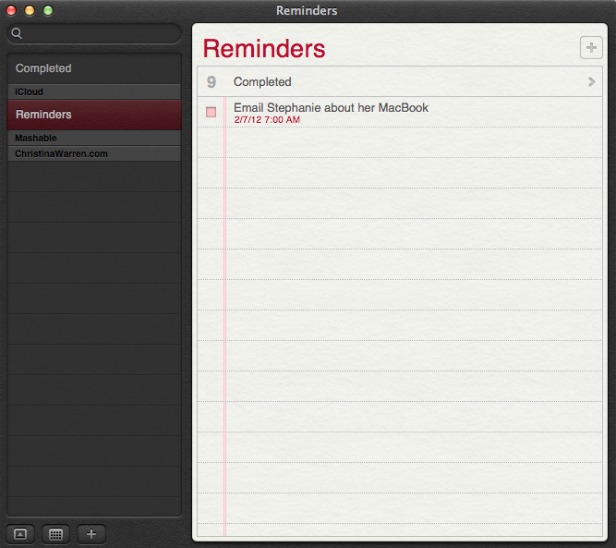
8. Reminders
The Reminders app that appeared with iOS 5 now has a Mac version, and it syncs across all your iOS devices via iCloud. The app lets you make a lists within tasks, and you can set alerts, too -- just like on iOS. One thing missing in the Mac version, though: the ability to set an a location-based alert, reminding you to do something when you arrive at or leave a place. You'll still need an iPhone or iPad to create those.


9. Notes
Like Reminders, Notes now gets an Mac version, with some special abilities. The app is compatible with rich text, letting you add photos, movies and bulleted lists to your notes. Plus you can treat them like Post-It notes, sticking individual notes to your screen so they always appear "on top" of your apps. Like reminders, Notes get the iCloud-syncing treatment across all your iOS devices.


10. Contacts
In Mountain Lion, Contacts replaces the Mac Address Book app, another sign of bringing the OS X experience with iOS.


11. Safari Tweaks
Apple's web browser gets a makeover with Mountain Lion, with many of the changes clearly influenced by the rapidly rising Google Chrome. The biggest change: the address bar and search field get combined into an "omnibox." Also, the Reader button becomes much more prominent, and Safari is finally ditching the "http://" -- just the URL is visible in casual browsing. Finally, you can now sync Safari tabs across devices via iCloud.


12. Gatekeeper
Apple has introduced a new way to protect your Mac from malware, called Gatekeeper. With Gatekeeper, you choose in your System Prefs the level of protection you want: whether to install and run apps from the Mac App Store only, from the store and trusted developers (vetted by Apple) or from anyone. Control-clicking will let you override your settings temporarily.


13. Apple ♥ China
Apple's business is booming in China (iPad trademark legal battles notwithstanding), and it clearly wants to make its products as Sino-friendly as possible. Mail, Contacts and Calendar all work with some of the top Chinese online services, including Baidu. Share Sheets for Chinese users will include China-based video-sharing websites and blogging services, and there are some improvements to basic text input as well.


14. Software Update Changes
Now clicking on Software Update will bring you right to the Mac App Store, and if there's new software available, you'll get a message in your Notification Center. Apple wants its App Store to be the primary way Mac users get software, and this is a sign that the company is eating its own dog food in that sense.


15. Just Call It "OS X"
It's a semantic change, but it worth noting that Apple has ditched the "Mac" part of "Mac OS X" when it refers to the new OS. Could that be a sign of an even deeper marrying of its desktop software with iOS down the road? Stay tuned.

[Source:Mashable]

Apple WWDC 2012 live update

Finally on 11 June 2012 Apple kicked off it's World Wide Developers' Conference (WWDC) event. New updates regarding to all Apple products will be unveiled. Event will be held till 15 Jun @ Moscone Center, San Francisco. First day was of software and unveiled new features of iOS6, Mac OS X 8.0 Mountain Lion, Macbooks and Apple Maps etc.


And following is a slideshow displaying major photos of First day of the event.


Thursday, May 3, 2012

Spotify has come to iPad

Spotify has received plenty of attention since it arrived 10 months ago in the US, and it was already quite popular in Europe prior to that. But they are far form being alone in the music streaming market, with Rhapsody, Slacker, Pandora, Rdio, MOG, and a few others battling it out for a piece of the pie.


Spotify users are finally getting the native iPad application they've been clamoring for some time. The app is available for free on the App Store, but like the company's existing mobile apps, it requires a $9.99 per month Premium subscription to use. That said, those without a Premium subscription can still try it free for 48 hours and also sign up for a further 30-day trial if they haven't done so in the past.


As you would expect, the app is optimized for the new iPad's Retina display and makes use of the extra screen real estate with high-resolution cover art images that can be scanned with a swipe, as well as menus and playlists presented in a layered UI that's somewhat reminiscent of Twitter for iPad.

Spotify for the iPad also comes with gapless playback and crossfade, two features the streaming music service launched in February, while supporting Apple's AirPlay technology for streaming music on compatible iOS devices and speaker systems. Check out the promo video above for a quick glimpse at some of these features.
The company wouldn't comment on whether an Android tablet version will follow any time soon.
For those unfamiliar with the service, Spotify offers free, ad-supported music streaming on the desktop from a catalog of over 17 million tracks. A $4.99 monthly plan gets rid of the ads and playback limitations, while the $9.99 per month plan enables streaming from mobile phones, tablets and other compatible devices.

Monday, April 16, 2012

New iPad in 12 more countries from April 27


Apple’s new iPad is coming to 12 additional countries on Friday, the company has announced.
Countries in which new iPad will be available on this date include: South Korea, Brunei, Croatia, Cyprus, Dominican Republic, El Salvador, Guatemala, Malaysia, Panama, St Maarten, Uruguay and Venezuela.
Additionally, the device will be available in 9 more countries on Friday, April 27: Colombia, Estonia, India, Israel, Latvia, Lithuania, Montenegro, South Africa and Thailand.
Apple’s new iPad brings an upgraded Retina display, quad-core graphics and a faster CPU. It’s available in black or white, with prices ranging from $499 to $829, depending on the model.

Tuesday, March 20, 2012

New iPad Smart cover problem


Smart covers, which attach to the iPad’s built-in magnets, are supposed to turn the tablet on automatically when you flip them open. But as dozens of iPad users in this Apple forum concurred, that was no longer the case with many smart covers on the new iPad.
That seemed odd, as the new iPad is physically no different from the iPad 2 — on the surface, at least. But it turns out Apple has been messing with the polarity of its magnets under the hood.
Photographer Mark Booth uncovered this when he did some experiments with magnets, iPads and a couple of smart covers. You can see the results in a video on Booth’s blog.
“The iPad 2′s sleep/wake sensor wasn’t polarity specific,” Booth explains. And that apparently led to an issue for iPad 2 users who flipped their smart covers around so that they sat flush with the back of the tablet — an everyday act that could cause the iPad 2 to switch off unintentionally.So it seems the new iPad’s sleep/wake sensor does require a specific polarity. But in fixing one issue, Apple appears to have caused another for users who want to use their old smart covers with their new tablets. 
Booth theorizes that Apple quietly made the polarity change in their smart covers at some point in 2011, since newer Apple-made smart covers do seem to work with the new iPad. If you got yours for the holidays, there’s a good chance you won’t see a problem.
If your smart cover hails from early 2011, try taking it back to the Apple store; Booth says he’s hearing from users that the store will exchange old smart covers for new ones.


[Source courtesy: Mashable]

Sunday, March 18, 2012

Verizon 4G iPads can also run on AT&T

Purchasing a Verizon iPad doesn’t mean you can’t also surf the web on AT&T’s network–for now, at least.
One enterprising MacRumors commenter, jsnuff1, discovered Friday morning that the Verizon version of the tablet can also run AT&T’s data network.All you have to do is swap out the micro-SIM in the tablet and update the iPad’s carrier settings.
“I was one of the first to obtain a Verizon iPad and can happily confirm that this is allowed,” writes jsnuff1. “I used my AT&T iPhone 4S sim card and took out the Verizon sim, and data worked! You must apply the AT&T APN carrier settings before this works though.” The commenter also shot a video of his iPad running on the network.
Sure enough, after inserting the AT&T micro-SIM from an iPhone 4S into a Verizon iPad, we saw the familiar “AT&T 4G” appear on the screen. Using an AT&T SIM in your Verizon iPad won’t actually get you 4G speeds.
That is likely why many opted to purchase the LTE version of the tablet over the Wi-Fi version in the first place. AT&T data cards will only be able to connect to the carrier’s 3G, HSPA+, and EDGE networks rather than the much faster LTE network the AT&T iPad runs on.
The fact that the Verizon iPad can run on other carrier’s networks also isn’t entirely surprising. The micro-SIM card slot on the tablet is designed to be used for roaming internationally when Verizon’s network isn’t available.
But it was expected that the slot would lock out other carriers while in the U.S. Apple may well fix that soon enough in a future iOS update.If they leave it this way, however, the functionality could come in handy for Verizon buyers when traveling in areas in the U.S. where they might not get the best coverage.


Wednesday, March 7, 2012

New iPad features

The new 9.7-inch iPad has 2048 x 1536-pixel retina display, 5-megapixel camera (with the same optics sensor from the iPhone 4S) and 1080p video recording. It is available March 16 in black and white, powered by A5X chip (with quad-core graphics) and supports 4G LTE networks. It's 9.4 millimeters thick and 1.4 pounds.
Pick up the new iPad and suddenly, it’s clear. You’re actually touching your photos, reading a book, playing the piano. Nothing comes between you and what you love. To make that hands-on experience even better, we made the fundamental elements of iPad better — the display, the camera, the wireless connection. All of which makes the new, third-generation iPad capable of so much more than you ever imagined.
Four times more pixels than iPad 2. Razor-sharp text. Richer colors. The Retina display transforms the entire iPad experience. So everything looks and feels incredibly lifelike and perfectly detailed. 
Apple is working on two LTE versions of the iPad with AT&T and Verizon in the U.S., as well as Rogers, Telus and Bell in Canada. Both LTE U.S. models will be 3G ready, too. 
The new iPad features Apple’s 5-megapixel iSight camera. Designed with advanced optics, it lets you shoot gorgeous photos and 1080p HD video. 
The new iPad features all of these built-in apps. A lot are same of iPad 2.
New iPad sports a new app for photo editing called iPhoto. It has a lot of pro like features. iPhoto on the iPad features smart browsing, multi-touch editing, professional quality effects, brushes, photo beaming and photo journals.


With brushes, touch-ups are exactly that — you use your finger to paint adjustments onto an image. Swipe over an area to make it lighter or darker. Zoom in to brush away blemishes with the powerful Repair tool. Select the Sharpen brush to bring out the fine details. Or use the Soften brush to smooth hard lines and edges. (It works wonders on wrinkles, too.) 
iPhoto completely changes the way you edit photos. You don’t need to be a professional or watch hours of web tutorials to know how it works. Simply touch the part of an image you want to change, then drag up, down, left, or right to turn any piece into a masterpiece. 
Choose from dozens of beautifully designed photo effects to give your pictures that little extra something. Something dramatic, something soft and dreamy, something from another era, or something just plain quirky. Use the swatch book to change the look and feel of each photo. Then pinch, zoom, or slide to adjust an effect. And just like that, you’ve applied hours of professional edits in the blink of an eye. 

For complete specifications for the new iPad, click here.