Showing posts with label iOS. Show all posts

Thursday, December 13, 2012

Google Maps for iOS is back, this time has new features


Look who's back. It's Google Maps, again for iPhone. Once removed from the iOS, it has made its entry back. This time with more power and let's say, more sexy. 

This a joyful news for everyone, even they use iPhone or not because Apple's decision was hated worldwide and the world was waiting for Google's next step. And Google too has not disappointed us. Google’s app includes voice guided turn-by-turn driving directions, as well as public transit directions, Street View, and a 3D-like Google Earth view.

Download here

Google Maps on iOS has trace similarities to its Android counterpart, but it's udesigned for Apple's platform. This time Google Maps has a new sleek interface, making similar to that of Google Now, and guided turn-by-turn directions and public transit maps. 

Daniel Graf, Director of Google Maps for Mobile, reported that the company took a step back from its earlier creations and approached it with a fresher, more streamlined outlook. That means a more elegant interface, totally from the base.

And it is the most amazing news that Google Maps for iOS is the most downloaded App in the App store, in just few hours.

Are you among the crowd to use New Google Maps? Share your views with us in comments.


Saturday, November 17, 2012

Android is on top of the market share

Android is king again. This year's Gartner's report says this. Android‘s overall smartphone market share has jumped to 72.4% in Q3 2012, up from 52.5% in the same period last year.

Apple has got reduction. Its smartphone OS, iOS has fall down from 15% to 13.9%. Microsoft is again struggling at the bottom, its Windows Phone managed to grow from 1.5% to 2.4%. Another player, Samsung’s Bada managed to increase its market share, from 1.5% to 2.4%.


But when talk comes to sales of devices, there is the king: Samsung. Samsung sold 97,956 devices in 3Q 2012 and secured 22.9% market share, while last year it was 18.7% with sales of 82,612 devices. A few time ago, samsung announced that 30 million units of Galaxy SIII have been sold.

Nokia is on the second place holding 19.2% of the market share while Apple is on third with 5.5% of market share. Other figures are as follows.

Sunday, October 7, 2012

Apple is solving the maps problem


A good news. Apple CEO Tim Cook admitted that rectifying Maps would be an ongoing process and that data will improve as more customers use it.

Apple has begun correcting the many inaccuracies and visual anomalies found in its new Maps app. Reports indicate that several of the most glaring mistakes — satellite images showing a distorted Brooklyn Bridge and missing Statue of Liberty among them — have quietly been fixed today. Just one week ago, Apple CEO Tim Cook issued a public apology to customers for delivering a Maps application he said "fell short" of the company's penchant for producing first-rate software. Cook said Apple would be working "non-stop" to improve the user experience; today's updates are the first discernible changes we've seen since the launch of iOS 6.

Plenty of outstanding issues remain, however, with international territories in particular affected by major flaws and less comprehensive mapping data compared to Google Maps.

Courtesy: The Verge

Sunday, September 16, 2012

iPhone 5: More or less


The iPhone 5 is finally here, and it’s — in a word — different. The new iPhone is the most radical redesign of Apple‘s flagship product since its inception, sporting a larger screen, a different shape, more features and even new accessories in the box.

The new model offers a lot that’s different from the old model, no question. If it seems like everyone has an iPhone, you’re not crazy. Apple reports having sold 400 million iOS devices worldwide since the iPhone’s 2007 debut.

The iPhone 4S broke Apple’s sales records selling 4 million units in the first three days of launch. We expect more figures from iPhone 5. 

Features:
  • iOS 6
  • 4G LTE
  • Larger Screen (4")
  • Longer battery life (8hrs.)
  • Sleek than iPhone 4S
  • Dual Core 1GHz A6 chip
  • 1GB RAM
  • Faster graphics
  • New sapphire iSight camera
  • Lightning dock connector
Read reviews and posts from popular sites

1) The Verge
2) Engadget
3) CNET
4) TechnoBuffalo
5) Mashable


Gallery


Slideshow


Wednesday, September 12, 2012

Join Apple on unveiling new iPhone and iPad


The family portrait you see above is likely what Apple’s mobile lineup will look like on retail shelves around the world this holiday season. Apple is gearing up for one of the biggest ever periods in technology, and it’ll need all the ammo at its insanely wealthy disposal if it wants to keep up.
The company will have papa iPad, the much rumored mama iPad mini, and the all-important iPhone 5, which we’ll know about at today’s event. The landscape is moving toward the 7-inch tablet range right now; they’re ultra-portable, lighter, and a bit easier to wield than larger alternatives. The render above is designed to give scale and demonstrate how the devices will look alongside each other.
It’s a pretty handsome looking lineup, one that’ll come up against devices like the Samsung Galaxy Note II, Nexus 7 and Microsoft Surface during the next few months. It’ll be mighty interesting to see if this model family is still at the top of the heap when 2013 rolls around.
Watch iPhone 5 live event: 

Tuesday, August 7, 2012

YouTube kicked out from iOS 6

Slowly but surely, it seems as though Apple’s mobile OS is being stripped of search giant Google’s influence. Apple’s redesigned Maps application — due to make its debut in iOS 6 — no longer makes use of Google’s map data, and that trend continues with another recently spotted change.
The latest beta version of iOS 6 no longer includes the YouTube app, which has been a mainstay of iOS homescreens since the original iPhone.
Google is already working on a replacement app – which this time it will maintain and distribute itself – while Apple highlights that YouTube video playback already works within Safari and doesn’t demand the standalone software anyway. However, rather than just pushing Google’s services further to the periphery, there’s also the chance that Apple could move to fill the ensuing gap with a video offering of its own.
Apple's entire statement is below.
  • Our license to include the YouTube app in iOS has ended, customers can use YouTube in the Safari browser and Google is working on a new YouTube app to be on the App Store.


Those sticking with older versions of iOS – either by choice or because their Apple gadget won’t support the new OS – won’t have to worry. Phones and tablets on iOS 5 and earlier will keep the existing YouTube app, as Apple’s license with Google apparently continues to cover it; the player won’t be deleted remotely or disabled.

For the end-user, it means YouTube won’t be at their fingertips from the get-go, though it also means Google can update and improve the app more frequently.

Friday, June 29, 2012

Watch Google I/O 2012 day 1 keynote


If you’ve missed out on some of the action from the first day of Google’s I/O conference, here’s a chance to relive it: Google has made available the video of the entire 2-hour opening keynote. Here is the link to it

Brief summary: 

Software

  • Android
In this event, Google released new version of Android code-named as JellyBean 4.1. They also displayed Project butter for increasing the graphic quality and rendering. It provides silky smooth acceleration to the devices. New Android also contains new Google search, camera, notifications, display, lock screen, play store etc. Download preview from here.

  • Chrome
New version of Chrome has been released and it will be available for all platforms that means Windows, Mac OS X, Android, Chrome OS and iOS. Yes you read right. Chrome will be available on App store (Download). And it has been updated for all platforms. Download chrome from here.

Hardware

  • Nexus Phone
Nexus smartphone is the device to get the JellyBean update. It has the same hardware, but the new OS. It will get update OTA (on-the-air) soon. On the 1st Attendees were gifted Nexus Phone. 

  • Nexus 7
Nexus 7 tab provides the smart browsing and full reading experience. It is developed by ASUS and will be available directly from Google Play. As the name shows it is a 7 inch tablet having Quad core CPU and 12 core GPU.


  • Nexus Q

Nexus Q is marketed by Google as the world’s first social Music streaming device. It connects over wifi and you and your friends can enjoy the playlist.


  • Google Glass
And finally Google Glasses were unveiled by some skydivers who logged in a Google+ hangout and dived from a helicopter. They landed above the Moscone Center, where the event was taking place. It was unveiled by Sergey Brin, co-founder of Google on day 2.

Attendees were gifted Nexus devices at the end of Day 1 event.


Watch the Day 1 event keynote video


Monday, June 11, 2012

Comparison between Google and Apple Maps


Google Maps has been available on the iPhone since the device’s launch, but on Monday Apple announced its own version of Maps for iOS 6 — one that will be replace the Google service on its smartphones.
Google recently announced an update to its mapping service as well. While both services certainly have a lot in common, there are also quite a few distinctive differences between the two.
A comparison between Apple maps and Google Maps

Traffic

Both Google Maps and Apple's Maps can give you traffic information as well as general directions.
Apple's Maps will also use crowd-sourced information on accidents, allowing you to better see potential slow downs before they slow you down.


Routing

Both maps will be able to give you driving and walking directions.
Apple Maps, however, will not offer public transportation maps at launch, unlike its Google counterpart.


Local Search

Apple's Maps offers a local search function that allows you to look up local restaurants and businesses.
While you can also look up restaurants using Google Maps, Apple's Maps will integrate in Yelp information, allowing you to check out restaurants by rating and read reviews.


Local search

Searches for local restaurants and businesses in Apple's Maps will show not only the business, but also its Yelp rating and reviews.


[Source: Mashable]

Mac OS X Mountain Lion 15 new features

Apple announced on Monday during its 23rd annual Worldwide Developers Conference that OS X Mountain Lion, the latest upgrade to its core Mac software, will be getting a series of enhancements.
Apple exec Craig Federrichi demoed various Mountain Lion features for attendees, highlighting Siri-like dictation, a Power Nap feature which updates your streams while the Mac sleeps and a tabview feature associated with the Safari browser, which allows you to zoom in and out. It will also get deeper integration with iCloud.
Mountain Lion will ship in July and cost $19.99. It will also serve as an upgrade to Snow Leopard.

Apple OS X Mountain Lion: 15 New Features

1. Deeper Integration With iCloud

Today, Apple's iCloud technology syncs media (music, photos) and some data among iPhones, iPads, iPod Touches and to a limited extent Macs. With OS X Mountain Lion, iCloud plays a greater role on the Mac side, syncing calendars, contacts and email across all your devices. iCloud syncing comes to a host more apps, including Messages, Notes and Reminders (more on those in a bit). As iCloud and the Mac evolve, Apple's vision of a unified experience across all devices is becoming clearer.


2. Messages Replaces iChat
With iOS 5, Apple introduced iMessage for its mobile devices, which emulated BlackBerry Messenger's ability to send messages either as text messages or pure data. Now iMessage gets a desktop friend: Messages, which replaces iChat and acts as an instant-messaging app (for accounts on AIM, Google Chat and others) that's iMessage-friendly. You can easily send photos and videos via messages, and you can launch FaceTime from the app, too. It's as yet unclear how it'll handle text messages sent to specific phone numbers, but it's another step toward a unified chat experience.


3. Notification Center
Notifications got a huge upgrade with iOS 5, so it only makes sense that similar technology makes an appearance on Mountain Lion. Notifications will have a unified look, popping up in the top right of the screen (no option to customize the location) and going away quickly. Sliding two fingers to the side on your trackpad will open up your notifications list on the right side of the screen, which looks almost exactly the same as its cousin on iOS.


4. Share Fast, Share Often
Apple has added a Share button to its apps, which it calls Share Sheets. Now when you're in Safari, you can quickly send a link. Same with photos from iPhoto (and Photo Booth!). There's also an option to add location. Tellingly, Twitter is an ubiquitous option while Facebook sharing has only been added to QuickTime.


5. Twitter, Twitter Everywhere
Twitter integration is now at the OS level with Mountain Lion, and logging in once from you System Preferences enables sharing across all apps. Share options for Twitter are built into almost all Apple apps, and any @replies and mentions you get will pop up as notifications.


6. Game Center
The iOS Game Center comes to the Mac, bringing with it leaderboards, game discovery from friends and even multiplayer gameplay. That's right, with Mountain Lion you'll be able to play games on your Mac with your friends in iOS devices, in real time. That is, as long as there's a Mac version -- good thing Apple is releasing the Game Kit tool to make it easier for developers to creat Mac games that play nice with Game Center.


7. AirPlay Mirroring
Apple AirPlay lets you wirelessly stream music and videos to any AirPlay-compatible device, which includes Apple TV. That means iPads and iPhones can stream video to a TV screen via Apple TV, and now Macs get added to that list with Mountain Lion. On the Mac, AirPlay mirroring can send whatever's on your screen to a TV set connected to an Apple TV (at 720p resolution), giving those videos and presentations room to stretch out.


8. Reminders
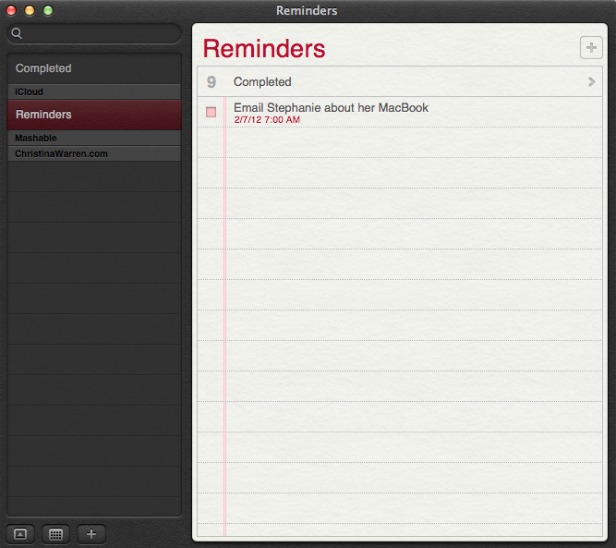
The Reminders app that appeared with iOS 5 now has a Mac version, and it syncs across all your iOS devices via iCloud. The app lets you make a lists within tasks, and you can set alerts, too -- just like on iOS. One thing missing in the Mac version, though: the ability to set an a location-based alert, reminding you to do something when you arrive at or leave a place. You'll still need an iPhone or iPad to create those.


9. Notes
Like Reminders, Notes now gets an Mac version, with some special abilities. The app is compatible with rich text, letting you add photos, movies and bulleted lists to your notes. Plus you can treat them like Post-It notes, sticking individual notes to your screen so they always appear "on top" of your apps. Like reminders, Notes get the iCloud-syncing treatment across all your iOS devices.


10. Contacts
In Mountain Lion, Contacts replaces the Mac Address Book app, another sign of bringing the OS X experience with iOS.


11. Safari Tweaks
Apple's web browser gets a makeover with Mountain Lion, with many of the changes clearly influenced by the rapidly rising Google Chrome. The biggest change: the address bar and search field get combined into an "omnibox." Also, the Reader button becomes much more prominent, and Safari is finally ditching the "http://" -- just the URL is visible in casual browsing. Finally, you can now sync Safari tabs across devices via iCloud.


12. Gatekeeper
Apple has introduced a new way to protect your Mac from malware, called Gatekeeper. With Gatekeeper, you choose in your System Prefs the level of protection you want: whether to install and run apps from the Mac App Store only, from the store and trusted developers (vetted by Apple) or from anyone. Control-clicking will let you override your settings temporarily.


13. Apple ♥ China
Apple's business is booming in China (iPad trademark legal battles notwithstanding), and it clearly wants to make its products as Sino-friendly as possible. Mail, Contacts and Calendar all work with some of the top Chinese online services, including Baidu. Share Sheets for Chinese users will include China-based video-sharing websites and blogging services, and there are some improvements to basic text input as well.


14. Software Update Changes
Now clicking on Software Update will bring you right to the Mac App Store, and if there's new software available, you'll get a message in your Notification Center. Apple wants its App Store to be the primary way Mac users get software, and this is a sign that the company is eating its own dog food in that sense.


15. Just Call It "OS X"
It's a semantic change, but it worth noting that Apple has ditched the "Mac" part of "Mac OS X" when it refers to the new OS. Could that be a sign of an even deeper marrying of its desktop software with iOS down the road? Stay tuned.

[Source:Mashable]

Apple WWDC 2012 live update

Finally on 11 June 2012 Apple kicked off it's World Wide Developers' Conference (WWDC) event. New updates regarding to all Apple products will be unveiled. Event will be held till 15 Jun @ Moscone Center, San Francisco. First day was of software and unveiled new features of iOS6, Mac OS X 8.0 Mountain Lion, Macbooks and Apple Maps etc.


And following is a slideshow displaying major photos of First day of the event.


Thursday, June 7, 2012

What will be new in iOS 6

As is always the case with every Apple event, there's really no way we can know what the company will announce at the Apple Worldwide Developers Conference keynote next Monday, June 11.  Apple is set to show off its latest mobile operating system next week, iOS 6. According to reports, Apple will focus primarily on major improvements to apps, while most functions of iOS will remain unchanged. iPad 3 owners will be happy to know that Siri is expected to launch on their devices with the release of iOS 6. So what does iOS 6 have in store for the rest of us?


  • Camera and Photos App Upgrades
    Perhaps to dovetail with expected iPhone 5 camera improvements, Apple will make significant changes to iOS 6 default Camera and Photos apps. Not only will videos synchronize with iCloud, but photo sharing and social networking functionality will be added to the apps. Apple will also add Facebook sharing functions directly into the apps for easy posting to friends.
  • Do Not Disturb
    Notifications will feature a simple toggle to indicate the iOS user does not want to be bothered. This is different from silencing the device or entering Airplane Mode. A do not disturb switch could hide all incoming notifications and cut off sounds until a later time, after the user switches the mode off to catch up.
  • Facebook Integration
    System-wide Facebook integration was rumored in previous versions of iOS, but now the addition is confirmed for iOS 6. Apple has made a deal with Facebook to add the social networking service to iOS much like Twitter came to us in iOS 5. Expect similar functionality, with Facebook features starting small and ramping up over time.
  • Google Maps Replaced by Apple 3D Maps
    Believe it or not, Apple is ditching Google Maps with iOS 6 and replacing the Maps app with its own mapping software developed in-house. These maps include fully 3D renderings of places and may even include turn-by-turn navigation instructions. The new Maps is certain to be a major focus of Apple's demos at WWDC next week.
  • Mail VIPs
    Several Mail app improvements are coming your way. Most notable is an iCloud-synced list of VIPs that would screen your email automatically. Messages coming from a VIP will be starred so they can be easily found among other incoming mail.
  • Redesigned Stores
    The App Store, iBookstore and iTunes Stores will all get redesigns. Besides Facebook integration coming to the iTunes Store, other social features will accomodate content sharing and interaction across the board. The new designs are also intended to improve the purchasing experience, and are expected to land on Apple's Mac OS X stores after the iOS 6 launch.
  • Safari iCloud Tabs Support / Omnibar
    Mobile Safari web browsing will get more convenient, with an iCloud Tabs button provided on iOS 6 devices. Clicking the button will sync your browser tabs to iCloud, so they can be picked up later on another mobile device or a Mac OS X computer. Also, Safari will get an all-in-one search/address bar just like Chrome. Pretty handy.
  • Siri Improvements
    Apple is always working to make Siri better, but there have been sporadic reports that the company plans to allow third-party app developers to interact with Siri's servers. This could provide a whole new take on what makes Siri useful with new apps across the board. Although this feature is not certain, we can be sure Apple will improve Siri beyond simply letting iPad 3 owners in on the fun.

Monday, April 16, 2012

New iPad in 12 more countries from April 27


Apple’s new iPad is coming to 12 additional countries on Friday, the company has announced.
Countries in which new iPad will be available on this date include: South Korea, Brunei, Croatia, Cyprus, Dominican Republic, El Salvador, Guatemala, Malaysia, Panama, St Maarten, Uruguay and Venezuela.
Additionally, the device will be available in 9 more countries on Friday, April 27: Colombia, Estonia, India, Israel, Latvia, Lithuania, Montenegro, South Africa and Thailand.
Apple’s new iPad brings an upgraded Retina display, quad-core graphics and a faster CPU. It’s available in black or white, with prices ranging from $499 to $829, depending on the model.

Friday, March 2, 2012

Titanic app for iPad coming this march


Commemorating the 100th anniversary of the sinking of the ship, the Titanic app is getting ready to set sail into the App Store. The iPad app, created by Britain’s The History Press, arrives on March 12.
Since her maiden voyage sinking on April 14, 1912, the story of the RMS Titanic has fascinated generations of fans and researchers alike. Now, as the world prepares for the centennial of the “ship of dreams,” a new app is arriving that looks back at its history and features.
The app (price to be announced) includes knowledge collected from many of the world’s leading Titanic experts. It includes rare archive footage, details and photographs of the ship’s construction, a sinking timeline and “Did You Know?” facts.
Other unique features include an interactive deck plan, detailed biographies of the ship’s key features, contemporary films, narrated survivor accounts and a wide range of photographs from every stage of the ship’s life.

The History Press’s sales and marketing director Tim Davies says:
”This year’s 100th anniversary of the sinking of the ship is already generating huge interest and is an opportunity to maximize the value of our extensive and definitive Titanic content and to deliver it in a new way. The Titanic App looks fantastic and we’re confident that both enthusiasts and general consumers alike will enjoy it enormously.”