Showing posts with label Cloud. Show all posts

Sunday, November 25, 2012

Protect Your Data With A Personal Cloud


Surpassing earthly boundaries, digital data storage has set up shop in the firmament. “The Cloud” is an increasingly popular term for remote data centers, usually with astronomical storage capacity, which people can access via the Internet using their various devices. 

Attempting to mimic the convenience of cloud computing, new technology allows people to set up a “personal cloud” on their home networks. Let’s backtrack and first take a moment to talk about the “public” cloud.


The Public Cloud


The cloud refers to anything from Dropbox, a storage space for personal files, to Netflix, a reservoir of movies and TV shows people can stream to their computers, tablets and phones. Internet giants like Google, Apple and Facebook all offer various forms of cloud services, which is often referred to as third-party data storage because the company that is hosting the data is separate from the entity that owns the data and the entity accessing it.

Based on private analysis, Gartner Inc., a technology research firm, believes cloud computing will continue to grow precipitously going forward.

“The reign of the personal computer as the sole corporate access device is coming to a close, and by 2014, the personal cloud will replace the personal computer at the center of users’ digital life,” the report concluded.

The popularity of the cloud stems from convenience and reliability. Conveniently, one can access his or her files anywhere the Internet is available. In addition, the cloud is reliable as a way to back up data. With traditional storage methods such as on a home computer or external hard drive, there is a risk of hardware failure, like when your computer breaks or you drop your external hard drive or iPod. As you might imagine, a cloud is significantly more difficult to destroy, and it’s a safe place for your data. 

The Personal Cloud 


Sharing is at the heart of cloud computing. Cloud services provide smart and easy-to-use channels to selectively make files available to friends, family and colleagues.

The personal cloud, like its public counterpart, can be a great tool for families. It is a convenient way to have a centralized location for pictures, videos and songs, stored right in your own home. Also, it allows for the peace of mind of having data automatically backed up in a safe, secure and nearby location, without having to wonder whether or not third parties have access to your private and personal information.

On the downside, security and privacy are serious concerns many have with sending data into the digital stratosphere. What are those companies doing with all that data you are sending to them anyway? Maybe they are using the information to build a marketing profile that they will turn around and sell to advertising companies.

Enter the personal cloud, a piece of hardware that works with your wireless router. When configured, the device automatically saves data from home computers, tablets, phones and game consoles onto a localized cloud. The data can be accessed by any device within the wireless network — like your smartphone, tablet and laptop.

When it comes to digital data storage, unlike weather, a cloudy horizon may not be foreboding. Thanks to the convenience of cloud computing, the days of toting around disks and drives (both floppy and hard) will soon be as out-of-date as yesterday’s iPhone.

Tuesday, October 23, 2012

Dropbox updates ios app for iPhone 5


Dropbox has released version 1.5.6 of its iOS app. It's now adapted for the iPhone 5's taller screen, and users are also finally able to download photos to their devices in full resolution. Previously the app downscaled photos when saving to the camera roll, so for example a 14-megapixel 4592 x 3056 image became just 960 x 638 when viewed on the iOS device. This was particularly aggravating when using the app on a Retina display, and made Dropbox less useful as a photo storage tool than it otherwise might have been — though it was possible to get around the limitation by saving images from Safari.
It's good to see the issue addressed, then, but the feature isn't without its problems. Downloads also take considerably longer than before even with this reduction in filesize, leaving us waiting a few minutes to save a single photo. All in all the update will please some people, but others might be frustrated if they prioritize speed over detail.

Thursday, October 18, 2012

AOL Launches Alto webmail client


AOL today announced Alto, a web-based IMAP email client that lets you manage multiple email accounts on one website. "We found that nobody wants another email address," Senior Director of Product for AOL Mail and Alto Joshua Ramirez told The Verge. "People have multiple email addresses, and they want to get it in one spot, so we went back to the drawing board and came up with something we think is game-changing." The web app is available today by invite only, and will launch to the general public in the first quarter of 2013.

Instead of singing up for a brand-new email address, users log into the service with an existing Gmail, Yahoo Mail, AOL or iCloud account and can use Alto to organize, send and receive messages. In addition to the traditional list view of received emails, Alto takes a cue from analog letters and automatically sorts mail into stacks depending on whether they contain attachments, photos, daily deals, notifications from social networks and bulletins from retailers. Users can customize and hide existing piles or even create new stacks based on key words, recipients, senders and other parameters.


Have more than one email account that needs its contents wrangled into order? No problem. Alto can handle up to five accounts per user. 

Courtesy: The Verge, Engadget

Thursday, August 30, 2012

Galaxy Cam: Android powered Camera


On Wednesday during the 2012 IFA conference in Berlin, Samsung unveiled an Android-powered Galaxy Camera you can partially control with your voice.
The new device, which looks like a camera in the front and a smartphone in the back, runs on Android 4.1 Jelly Bean, and allows users to shoot, edit and share pictures with their social networks. But perhaps one of the most innovative features of the Galaxy Camera is its voice-control capabilities. You can tell the device to “zoom in” and “shoot” while snapping pictures.
Specs include a 21x optical touch zoom lens, a 4.8-inch HD Super Clear LCD display and a bright 16M BSI CMOS sensor and a quad-core processor. The Galaxy Camera also enables connectivity through 3G and 4G.
Icing on the cake is "Auto Cloud Backup", which automatically saves photos into Samsung’s AllShare cloud service. 

Gallery (Click on images to get full view)


Monday, June 11, 2012

Mac OS X Mountain Lion 15 new features

Apple announced on Monday during its 23rd annual Worldwide Developers Conference that OS X Mountain Lion, the latest upgrade to its core Mac software, will be getting a series of enhancements.
Apple exec Craig Federrichi demoed various Mountain Lion features for attendees, highlighting Siri-like dictation, a Power Nap feature which updates your streams while the Mac sleeps and a tabview feature associated with the Safari browser, which allows you to zoom in and out. It will also get deeper integration with iCloud.
Mountain Lion will ship in July and cost $19.99. It will also serve as an upgrade to Snow Leopard.

Apple OS X Mountain Lion: 15 New Features

1. Deeper Integration With iCloud

Today, Apple's iCloud technology syncs media (music, photos) and some data among iPhones, iPads, iPod Touches and to a limited extent Macs. With OS X Mountain Lion, iCloud plays a greater role on the Mac side, syncing calendars, contacts and email across all your devices. iCloud syncing comes to a host more apps, including Messages, Notes and Reminders (more on those in a bit). As iCloud and the Mac evolve, Apple's vision of a unified experience across all devices is becoming clearer.


2. Messages Replaces iChat
With iOS 5, Apple introduced iMessage for its mobile devices, which emulated BlackBerry Messenger's ability to send messages either as text messages or pure data. Now iMessage gets a desktop friend: Messages, which replaces iChat and acts as an instant-messaging app (for accounts on AIM, Google Chat and others) that's iMessage-friendly. You can easily send photos and videos via messages, and you can launch FaceTime from the app, too. It's as yet unclear how it'll handle text messages sent to specific phone numbers, but it's another step toward a unified chat experience.


3. Notification Center
Notifications got a huge upgrade with iOS 5, so it only makes sense that similar technology makes an appearance on Mountain Lion. Notifications will have a unified look, popping up in the top right of the screen (no option to customize the location) and going away quickly. Sliding two fingers to the side on your trackpad will open up your notifications list on the right side of the screen, which looks almost exactly the same as its cousin on iOS.


4. Share Fast, Share Often
Apple has added a Share button to its apps, which it calls Share Sheets. Now when you're in Safari, you can quickly send a link. Same with photos from iPhoto (and Photo Booth!). There's also an option to add location. Tellingly, Twitter is an ubiquitous option while Facebook sharing has only been added to QuickTime.


5. Twitter, Twitter Everywhere
Twitter integration is now at the OS level with Mountain Lion, and logging in once from you System Preferences enables sharing across all apps. Share options for Twitter are built into almost all Apple apps, and any @replies and mentions you get will pop up as notifications.


6. Game Center
The iOS Game Center comes to the Mac, bringing with it leaderboards, game discovery from friends and even multiplayer gameplay. That's right, with Mountain Lion you'll be able to play games on your Mac with your friends in iOS devices, in real time. That is, as long as there's a Mac version -- good thing Apple is releasing the Game Kit tool to make it easier for developers to creat Mac games that play nice with Game Center.


7. AirPlay Mirroring
Apple AirPlay lets you wirelessly stream music and videos to any AirPlay-compatible device, which includes Apple TV. That means iPads and iPhones can stream video to a TV screen via Apple TV, and now Macs get added to that list with Mountain Lion. On the Mac, AirPlay mirroring can send whatever's on your screen to a TV set connected to an Apple TV (at 720p resolution), giving those videos and presentations room to stretch out.


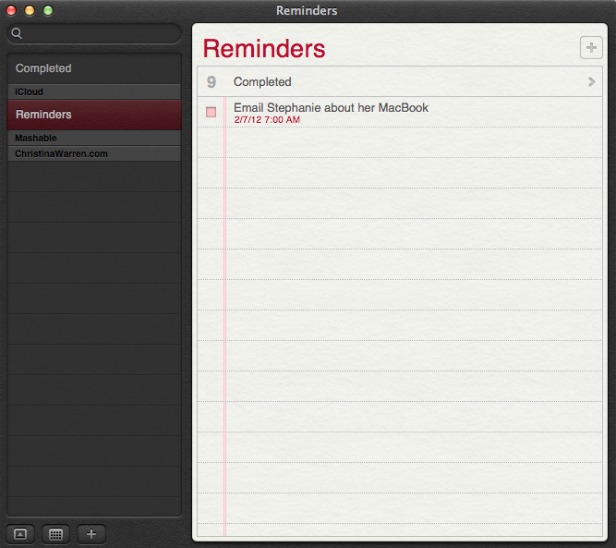
8. Reminders
The Reminders app that appeared with iOS 5 now has a Mac version, and it syncs across all your iOS devices via iCloud. The app lets you make a lists within tasks, and you can set alerts, too -- just like on iOS. One thing missing in the Mac version, though: the ability to set an a location-based alert, reminding you to do something when you arrive at or leave a place. You'll still need an iPhone or iPad to create those.


9. Notes
Like Reminders, Notes now gets an Mac version, with some special abilities. The app is compatible with rich text, letting you add photos, movies and bulleted lists to your notes. Plus you can treat them like Post-It notes, sticking individual notes to your screen so they always appear "on top" of your apps. Like reminders, Notes get the iCloud-syncing treatment across all your iOS devices.


10. Contacts
In Mountain Lion, Contacts replaces the Mac Address Book app, another sign of bringing the OS X experience with iOS.


11. Safari Tweaks
Apple's web browser gets a makeover with Mountain Lion, with many of the changes clearly influenced by the rapidly rising Google Chrome. The biggest change: the address bar and search field get combined into an "omnibox." Also, the Reader button becomes much more prominent, and Safari is finally ditching the "http://" -- just the URL is visible in casual browsing. Finally, you can now sync Safari tabs across devices via iCloud.


12. Gatekeeper
Apple has introduced a new way to protect your Mac from malware, called Gatekeeper. With Gatekeeper, you choose in your System Prefs the level of protection you want: whether to install and run apps from the Mac App Store only, from the store and trusted developers (vetted by Apple) or from anyone. Control-clicking will let you override your settings temporarily.


13. Apple ♥ China
Apple's business is booming in China (iPad trademark legal battles notwithstanding), and it clearly wants to make its products as Sino-friendly as possible. Mail, Contacts and Calendar all work with some of the top Chinese online services, including Baidu. Share Sheets for Chinese users will include China-based video-sharing websites and blogging services, and there are some improvements to basic text input as well.


14. Software Update Changes
Now clicking on Software Update will bring you right to the Mac App Store, and if there's new software available, you'll get a message in your Notification Center. Apple wants its App Store to be the primary way Mac users get software, and this is a sign that the company is eating its own dog food in that sense.


15. Just Call It "OS X"
It's a semantic change, but it worth noting that Apple has ditched the "Mac" part of "Mac OS X" when it refers to the new OS. Could that be a sign of an even deeper marrying of its desktop software with iOS down the road? Stay tuned.

[Source:Mashable]

Apple WWDC 2012 live update

Finally on 11 June 2012 Apple kicked off it's World Wide Developers' Conference (WWDC) event. New updates regarding to all Apple products will be unveiled. Event will be held till 15 Jun @ Moscone Center, San Francisco. First day was of software and unveiled new features of iOS6, Mac OS X 8.0 Mountain Lion, Macbooks and Apple Maps etc.


And following is a slideshow displaying major photos of First day of the event.


Thursday, June 7, 2012

What will be new in iOS 6

As is always the case with every Apple event, there's really no way we can know what the company will announce at the Apple Worldwide Developers Conference keynote next Monday, June 11.  Apple is set to show off its latest mobile operating system next week, iOS 6. According to reports, Apple will focus primarily on major improvements to apps, while most functions of iOS will remain unchanged. iPad 3 owners will be happy to know that Siri is expected to launch on their devices with the release of iOS 6. So what does iOS 6 have in store for the rest of us?


  • Camera and Photos App Upgrades
    Perhaps to dovetail with expected iPhone 5 camera improvements, Apple will make significant changes to iOS 6 default Camera and Photos apps. Not only will videos synchronize with iCloud, but photo sharing and social networking functionality will be added to the apps. Apple will also add Facebook sharing functions directly into the apps for easy posting to friends.
  • Do Not Disturb
    Notifications will feature a simple toggle to indicate the iOS user does not want to be bothered. This is different from silencing the device or entering Airplane Mode. A do not disturb switch could hide all incoming notifications and cut off sounds until a later time, after the user switches the mode off to catch up.
  • Facebook Integration
    System-wide Facebook integration was rumored in previous versions of iOS, but now the addition is confirmed for iOS 6. Apple has made a deal with Facebook to add the social networking service to iOS much like Twitter came to us in iOS 5. Expect similar functionality, with Facebook features starting small and ramping up over time.
  • Google Maps Replaced by Apple 3D Maps
    Believe it or not, Apple is ditching Google Maps with iOS 6 and replacing the Maps app with its own mapping software developed in-house. These maps include fully 3D renderings of places and may even include turn-by-turn navigation instructions. The new Maps is certain to be a major focus of Apple's demos at WWDC next week.
  • Mail VIPs
    Several Mail app improvements are coming your way. Most notable is an iCloud-synced list of VIPs that would screen your email automatically. Messages coming from a VIP will be starred so they can be easily found among other incoming mail.
  • Redesigned Stores
    The App Store, iBookstore and iTunes Stores will all get redesigns. Besides Facebook integration coming to the iTunes Store, other social features will accomodate content sharing and interaction across the board. The new designs are also intended to improve the purchasing experience, and are expected to land on Apple's Mac OS X stores after the iOS 6 launch.
  • Safari iCloud Tabs Support / Omnibar
    Mobile Safari web browsing will get more convenient, with an iCloud Tabs button provided on iOS 6 devices. Clicking the button will sync your browser tabs to iCloud, so they can be picked up later on another mobile device or a Mac OS X computer. Also, Safari will get an all-in-one search/address bar just like Chrome. Pretty handy.
  • Siri Improvements
    Apple is always working to make Siri better, but there have been sporadic reports that the company plans to allow third-party app developers to interact with Siri's servers. This could provide a whole new take on what makes Siri useful with new apps across the board. Although this feature is not certain, we can be sure Apple will improve Siri beyond simply letting iPad 3 owners in on the fun.

Sunday, April 22, 2012

Google drive accidentally shown on Hangout

We keep hearing about the pending launch of Google Drive, the company’s cloud storage service that will support Android and iOS devices. Most recently, the word on the street is Google could make things official as soon as next week.
It’s seeming increasingly likely that the company will have to acknowledge Drive sooner or later, as yet another Drive leak has come out, and this one in a very public fashion.
We’ve already seen screenshots from users who claimed to have early access to Drive, showing-off the service’s PC interface. Around the same time, we also got a look at what was supposedly the Drive icon, a three-color folded triangle design.
During Friday’s Android Developers Hangout video, while showing some features on his phone, a Google employee pulled-up a list of sharing options, including none other than Google Drive, complete with that icon. Google quickly reacted by taking the video down, but not before it could be archived.
At this point, it seems like the Drive cat is soundly out of the bag, so hopefully Google really will be publicly announcing the service in the near future.