Showing posts with label Operating system. Show all posts

Friday, October 26, 2012

Microsoft Surface RT Pictures


Windows 8 represents another radical shift for Microsoft, as the company bets on tablet computers and other touchscreen devices as the future of personal computing.
The new "Metro" interface offers a tile-based Start screen similar to that of the Windows Phone OS.

Here are some pictures of the newly released Microsoft Surface RT.

[Click on the images to get full view]


Windows 8 finally launched


Microsoft officially announced Windows 8 Thursday at a massive event in New York City.
Windows 8 will be available in 140 markets and in 37 languages on Friday. Users can start downloading Windows 8 at 12:01 a.m. and copies will be available in stores at midnight local time at retailers around the globe.
Existing Windows owners can upgrade to Windows 8 for $39.99.In addition to Windows 8 and Windows 8 Pro, Microsoft is also announcing Windows RT. Windows RT will come preloaded on ARM devices such as the Microsoft Surface tablet.
At the launch event, Microsoft CEO Steve Ballmer said that Windows 8 is ushering in a “new era for Microsoft.” Windows 8 is the first product of this new era. With the release of this version of Windows and Surface Tablet, it seems that Microsoft is tightening its grip to hold the crown for being the best. 

Windows 8 ads


Apple has refreshed its Mac lineup and introduced a new iPad mini, but that's not stopping Microsoft from promoting Windows 8. Redmond based company has released four new ads that will be shown globally.
Microsoft has put its all effort to promote Windows 8.  


Advertising agency Crispin, Porter and Bogusky created the ads for Microsoft, with certain features localized in particular regions.

"We didn’t get too literal," says Rob Reilly of Crispin, Porter and Bogusky. "It’s not about landing features and scenarios." The latest round of ads follow on from Microsoft's initial Windows 8 ad that started airing in the US earlier this month.


Thursday, October 18, 2012

Nokia temporarily shuts down Symbian OS


If you owned a Nokia smartphone before the Finnish firm adopted Microsoft’s Windows Phone platform, chances are it was running Symbian. It was once a hugely popular platform, but the likes of Android and iOS — and indeed Windows Phone in recent years — have quickly eaten away at its market share.
It’s no surprise, then, to hear that Nokia is finally pulling the plug on the operating system and sending it into “maintenance mode.” Its latest update, Belle Feature Pack 2, will be the last, and no new features will be added by Nokia. The company confirmed its move in an email to a Symbian developer who reported a bug with the Nokia Drive app.
Is it the end of Symbian, or the Finnish mobile giant has some new plans to relaunch Symbian in a new Avatar, and new power too. Share your views in comments.
Courtesy: Techno Buffalo

Wednesday, September 12, 2012

500 Million Android Activations


Google’s Director of Product Management for Android, Hugo Barra, has posted on Google+ this morning to announce that 500 million Android devices have now been activated globally.
It’s a huge milestone for the company, but it’s one that will quickly be surpassed. Barra also reaffirmed that a whopping 1.3 million Android devices are now being activated every single dayThat means that by the end of the year, that total figure should look a lot more like 600 million — especially with the lucrative holiday season coming up.
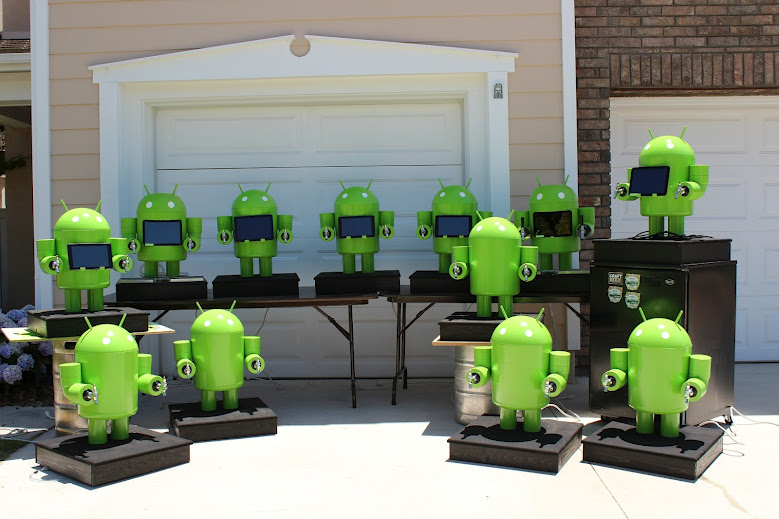
Barra also announced on Google+ that the company’s Jelly Bean statue (above) is now sat outside of its Mountain View headquarters again. The figure was removed after its plastic head melted in the Californian sun over the summer, but it’s now been fixed.
The milestone is a steady improvement from the announcement of 300 million Android activations back in February and 400 million at June's Google I/O conference. 
Apple used to take part in this game, regularly announcing daily iOS device activations up until 2010, which may or may not have something to do with the fact that Android surpassed iOS in 2011.

Wednesday, July 25, 2012

Mountain Lion Finally available

Apple developers, start your engines. Mac users, start dreaming of how much cooler your desktop or laptop experience could be this summer. And you don't need to wait much, because Mountain Lion is now available in the Mac App Store. Yes you read right, Apple has released it today, 25-Jun-12 at the price of $19.99.


Here's the link to App Store
http://bit.ly/Q1MFQ0


Well, here’s the next phase in the relationship, and iOS has practically moved in to Mac’s house. If Lion was a toothbrush in the bathroom, Mountain Lion is a chest of drawers in the bedroom. Reminders, iMessage, Game Center, Notifications, iCloud and Twitter integration — all iOS’s most intimate stuff is here, and it all pretty much looks the same as it does on the iPad. Most of it is designed to sync up so it is exactly the same.


Developers are going to have to make two separate versions of apps they want on Mac and iOS for some time to come, and that’s just fine with Apple. When it comes to its two operating systems, the company seems to believe living together is good enough.


Screenshots of Mountain Lion


We haven't got the chance to test the new Version of OS X, so we are taking help of some sites available on web. These will provide you the reviews, news and videos regarding this. Hope you will get the info you would like to see, and if there's a problem please feel free to share with us in comments. 


Links from other Sites: 


Life Hacker: http://lifehacker.com/5928780/how-to-burn-os-x-mountain-lion-to-a-dvd-or-usb-flash-drive


Apple: Introducing Mac OS X Mountain Lion


Thanks to: Apple, Mashable, Engadget, The Verge, Life Hacker, CNET, Cult of Mac, Mac World, Mac.Blorge and whole Web. 

Friday, July 20, 2012

Windows 8 release date: 26 Oct 2012


Windows 8 is, without doubt, Microsoft’s most ambitious release in recent memory. It does away with a lot of what users have come to expect from Windows over the years.


And on Wednesday (18 Jun 2012), Microsoft announced the release date of Windows 8 as 26 Oct 2012.  The company had previously announced a “late October” launch date for the new OS, but Steven Sinofsky, president of the Windows and Windows Live unit at Microsoft announced the more specific date at the company’s annual sales meeting. The date was updated on Windows 8′s Wikipedia page within minutes of the announcement. 


Earlier this month the OS-maker said those using the release preview version of Windows 8 will be able to upgrade to the final release for $39.99 using the Windows.com upgrade tool. Those that purchase a new computer between June 2 2012 and January 31 2013 will also be eligible to upgrade to Windows 8 Professional for just $14.99.
While consumers have been treated to two previews of Windows 8 to date, it is likely Microsoft will leave some of the new features for the upcoming launch, and right now it’s hard to say whether further tweaks will be made to the highly controversial Metro UI before it reaches RTM.
Not only will Windows 8 ship on partner devices in late October, but the company revealed that Windows 8 will, at the same time, ship in 109 countries and 231 languages.


Windows 8 Release preview


Friday, June 29, 2012

Watch Google I/O 2012 day 1 keynote


If you’ve missed out on some of the action from the first day of Google’s I/O conference, here’s a chance to relive it: Google has made available the video of the entire 2-hour opening keynote. Here is the link to it

Brief summary: 

Software

  • Android
In this event, Google released new version of Android code-named as JellyBean 4.1. They also displayed Project butter for increasing the graphic quality and rendering. It provides silky smooth acceleration to the devices. New Android also contains new Google search, camera, notifications, display, lock screen, play store etc. Download preview from here.

  • Chrome
New version of Chrome has been released and it will be available for all platforms that means Windows, Mac OS X, Android, Chrome OS and iOS. Yes you read right. Chrome will be available on App store (Download). And it has been updated for all platforms. Download chrome from here.

Hardware

  • Nexus Phone
Nexus smartphone is the device to get the JellyBean update. It has the same hardware, but the new OS. It will get update OTA (on-the-air) soon. On the 1st Attendees were gifted Nexus Phone. 

  • Nexus 7
Nexus 7 tab provides the smart browsing and full reading experience. It is developed by ASUS and will be available directly from Google Play. As the name shows it is a 7 inch tablet having Quad core CPU and 12 core GPU.


  • Nexus Q

Nexus Q is marketed by Google as the world’s first social Music streaming device. It connects over wifi and you and your friends can enjoy the playlist.


  • Google Glass
And finally Google Glasses were unveiled by some skydivers who logged in a Google+ hangout and dived from a helicopter. They landed above the Moscone Center, where the event was taking place. It was unveiled by Sergey Brin, co-founder of Google on day 2.

Attendees were gifted Nexus devices at the end of Day 1 event.


Watch the Day 1 event keynote video


Monday, June 11, 2012

Mac OS X Mountain Lion 15 new features

Apple announced on Monday during its 23rd annual Worldwide Developers Conference that OS X Mountain Lion, the latest upgrade to its core Mac software, will be getting a series of enhancements.
Apple exec Craig Federrichi demoed various Mountain Lion features for attendees, highlighting Siri-like dictation, a Power Nap feature which updates your streams while the Mac sleeps and a tabview feature associated with the Safari browser, which allows you to zoom in and out. It will also get deeper integration with iCloud.
Mountain Lion will ship in July and cost $19.99. It will also serve as an upgrade to Snow Leopard.

Apple OS X Mountain Lion: 15 New Features

1. Deeper Integration With iCloud

Today, Apple's iCloud technology syncs media (music, photos) and some data among iPhones, iPads, iPod Touches and to a limited extent Macs. With OS X Mountain Lion, iCloud plays a greater role on the Mac side, syncing calendars, contacts and email across all your devices. iCloud syncing comes to a host more apps, including Messages, Notes and Reminders (more on those in a bit). As iCloud and the Mac evolve, Apple's vision of a unified experience across all devices is becoming clearer.


2. Messages Replaces iChat
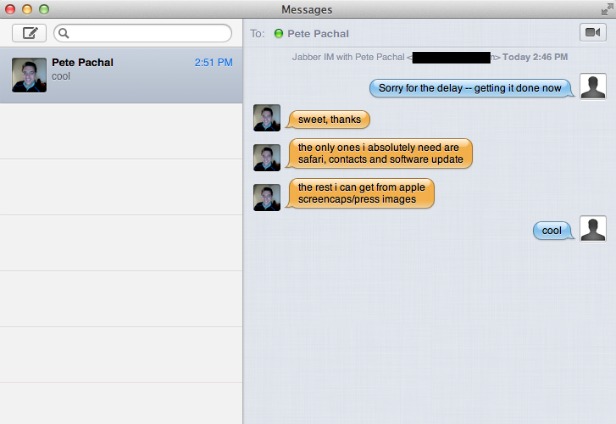
With iOS 5, Apple introduced iMessage for its mobile devices, which emulated BlackBerry Messenger's ability to send messages either as text messages or pure data. Now iMessage gets a desktop friend: Messages, which replaces iChat and acts as an instant-messaging app (for accounts on AIM, Google Chat and others) that's iMessage-friendly. You can easily send photos and videos via messages, and you can launch FaceTime from the app, too. It's as yet unclear how it'll handle text messages sent to specific phone numbers, but it's another step toward a unified chat experience.


3. Notification Center
Notifications got a huge upgrade with iOS 5, so it only makes sense that similar technology makes an appearance on Mountain Lion. Notifications will have a unified look, popping up in the top right of the screen (no option to customize the location) and going away quickly. Sliding two fingers to the side on your trackpad will open up your notifications list on the right side of the screen, which looks almost exactly the same as its cousin on iOS.


4. Share Fast, Share Often
Apple has added a Share button to its apps, which it calls Share Sheets. Now when you're in Safari, you can quickly send a link. Same with photos from iPhoto (and Photo Booth!). There's also an option to add location. Tellingly, Twitter is an ubiquitous option while Facebook sharing has only been added to QuickTime.


5. Twitter, Twitter Everywhere
Twitter integration is now at the OS level with Mountain Lion, and logging in once from you System Preferences enables sharing across all apps. Share options for Twitter are built into almost all Apple apps, and any @replies and mentions you get will pop up as notifications.


6. Game Center
The iOS Game Center comes to the Mac, bringing with it leaderboards, game discovery from friends and even multiplayer gameplay. That's right, with Mountain Lion you'll be able to play games on your Mac with your friends in iOS devices, in real time. That is, as long as there's a Mac version -- good thing Apple is releasing the Game Kit tool to make it easier for developers to creat Mac games that play nice with Game Center.


7. AirPlay Mirroring
Apple AirPlay lets you wirelessly stream music and videos to any AirPlay-compatible device, which includes Apple TV. That means iPads and iPhones can stream video to a TV screen via Apple TV, and now Macs get added to that list with Mountain Lion. On the Mac, AirPlay mirroring can send whatever's on your screen to a TV set connected to an Apple TV (at 720p resolution), giving those videos and presentations room to stretch out.


8. Reminders
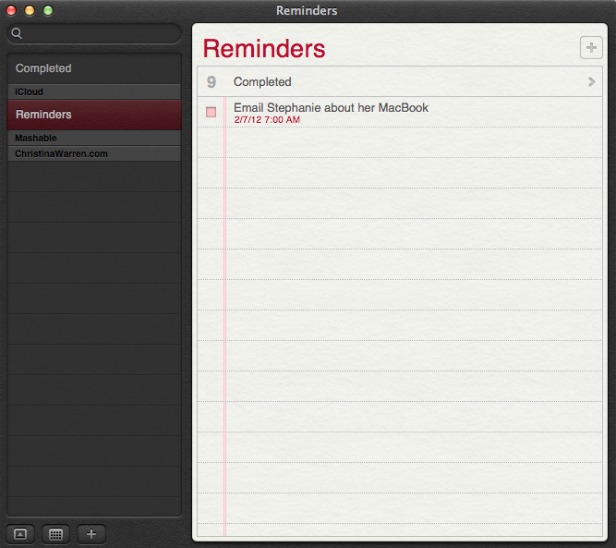
The Reminders app that appeared with iOS 5 now has a Mac version, and it syncs across all your iOS devices via iCloud. The app lets you make a lists within tasks, and you can set alerts, too -- just like on iOS. One thing missing in the Mac version, though: the ability to set an a location-based alert, reminding you to do something when you arrive at or leave a place. You'll still need an iPhone or iPad to create those.


9. Notes
Like Reminders, Notes now gets an Mac version, with some special abilities. The app is compatible with rich text, letting you add photos, movies and bulleted lists to your notes. Plus you can treat them like Post-It notes, sticking individual notes to your screen so they always appear "on top" of your apps. Like reminders, Notes get the iCloud-syncing treatment across all your iOS devices.


10. Contacts
In Mountain Lion, Contacts replaces the Mac Address Book app, another sign of bringing the OS X experience with iOS.


11. Safari Tweaks
Apple's web browser gets a makeover with Mountain Lion, with many of the changes clearly influenced by the rapidly rising Google Chrome. The biggest change: the address bar and search field get combined into an "omnibox." Also, the Reader button becomes much more prominent, and Safari is finally ditching the "http://" -- just the URL is visible in casual browsing. Finally, you can now sync Safari tabs across devices via iCloud.


12. Gatekeeper
Apple has introduced a new way to protect your Mac from malware, called Gatekeeper. With Gatekeeper, you choose in your System Prefs the level of protection you want: whether to install and run apps from the Mac App Store only, from the store and trusted developers (vetted by Apple) or from anyone. Control-clicking will let you override your settings temporarily.


13. Apple ♥ China
Apple's business is booming in China (iPad trademark legal battles notwithstanding), and it clearly wants to make its products as Sino-friendly as possible. Mail, Contacts and Calendar all work with some of the top Chinese online services, including Baidu. Share Sheets for Chinese users will include China-based video-sharing websites and blogging services, and there are some improvements to basic text input as well.


14. Software Update Changes
Now clicking on Software Update will bring you right to the Mac App Store, and if there's new software available, you'll get a message in your Notification Center. Apple wants its App Store to be the primary way Mac users get software, and this is a sign that the company is eating its own dog food in that sense.


15. Just Call It "OS X"
It's a semantic change, but it worth noting that Apple has ditched the "Mac" part of "Mac OS X" when it refers to the new OS. Could that be a sign of an even deeper marrying of its desktop software with iOS down the road? Stay tuned.

[Source:Mashable]