Showing posts with label Twitter. Show all posts

Wednesday, July 25, 2012

Mountain Lion Finally available

Apple developers, start your engines. Mac users, start dreaming of how much cooler your desktop or laptop experience could be this summer. And you don't need to wait much, because Mountain Lion is now available in the Mac App Store. Yes you read right, Apple has released it today, 25-Jun-12 at the price of $19.99.


Here's the link to App Store
http://bit.ly/Q1MFQ0


Well, here’s the next phase in the relationship, and iOS has practically moved in to Mac’s house. If Lion was a toothbrush in the bathroom, Mountain Lion is a chest of drawers in the bedroom. Reminders, iMessage, Game Center, Notifications, iCloud and Twitter integration — all iOS’s most intimate stuff is here, and it all pretty much looks the same as it does on the iPad. Most of it is designed to sync up so it is exactly the same.


Developers are going to have to make two separate versions of apps they want on Mac and iOS for some time to come, and that’s just fine with Apple. When it comes to its two operating systems, the company seems to believe living together is good enough.


Screenshots of Mountain Lion


We haven't got the chance to test the new Version of OS X, so we are taking help of some sites available on web. These will provide you the reviews, news and videos regarding this. Hope you will get the info you would like to see, and if there's a problem please feel free to share with us in comments. 


Links from other Sites: 


Life Hacker: http://lifehacker.com/5928780/how-to-burn-os-x-mountain-lion-to-a-dvd-or-usb-flash-drive


Apple: Introducing Mac OS X Mountain Lion


Thanks to: Apple, Mashable, Engadget, The Verge, Life Hacker, CNET, Cult of Mac, Mac World, Mac.Blorge and whole Web. 

Monday, June 11, 2012

Mac OS X Mountain Lion 15 new features

Apple announced on Monday during its 23rd annual Worldwide Developers Conference that OS X Mountain Lion, the latest upgrade to its core Mac software, will be getting a series of enhancements.
Apple exec Craig Federrichi demoed various Mountain Lion features for attendees, highlighting Siri-like dictation, a Power Nap feature which updates your streams while the Mac sleeps and a tabview feature associated with the Safari browser, which allows you to zoom in and out. It will also get deeper integration with iCloud.
Mountain Lion will ship in July and cost $19.99. It will also serve as an upgrade to Snow Leopard.

Apple OS X Mountain Lion: 15 New Features

1. Deeper Integration With iCloud

Today, Apple's iCloud technology syncs media (music, photos) and some data among iPhones, iPads, iPod Touches and to a limited extent Macs. With OS X Mountain Lion, iCloud plays a greater role on the Mac side, syncing calendars, contacts and email across all your devices. iCloud syncing comes to a host more apps, including Messages, Notes and Reminders (more on those in a bit). As iCloud and the Mac evolve, Apple's vision of a unified experience across all devices is becoming clearer.


2. Messages Replaces iChat
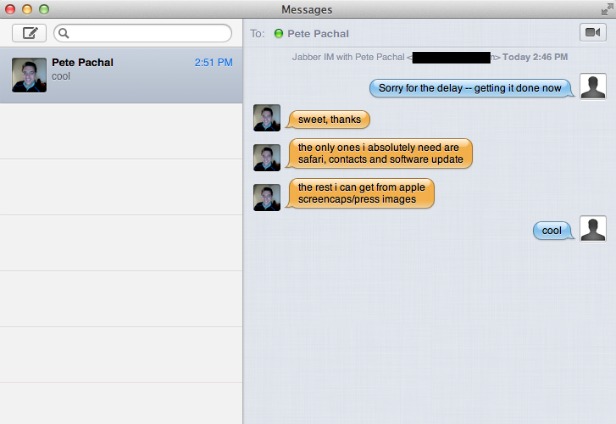
With iOS 5, Apple introduced iMessage for its mobile devices, which emulated BlackBerry Messenger's ability to send messages either as text messages or pure data. Now iMessage gets a desktop friend: Messages, which replaces iChat and acts as an instant-messaging app (for accounts on AIM, Google Chat and others) that's iMessage-friendly. You can easily send photos and videos via messages, and you can launch FaceTime from the app, too. It's as yet unclear how it'll handle text messages sent to specific phone numbers, but it's another step toward a unified chat experience.


3. Notification Center
Notifications got a huge upgrade with iOS 5, so it only makes sense that similar technology makes an appearance on Mountain Lion. Notifications will have a unified look, popping up in the top right of the screen (no option to customize the location) and going away quickly. Sliding two fingers to the side on your trackpad will open up your notifications list on the right side of the screen, which looks almost exactly the same as its cousin on iOS.


4. Share Fast, Share Often
Apple has added a Share button to its apps, which it calls Share Sheets. Now when you're in Safari, you can quickly send a link. Same with photos from iPhoto (and Photo Booth!). There's also an option to add location. Tellingly, Twitter is an ubiquitous option while Facebook sharing has only been added to QuickTime.


5. Twitter, Twitter Everywhere
Twitter integration is now at the OS level with Mountain Lion, and logging in once from you System Preferences enables sharing across all apps. Share options for Twitter are built into almost all Apple apps, and any @replies and mentions you get will pop up as notifications.


6. Game Center
The iOS Game Center comes to the Mac, bringing with it leaderboards, game discovery from friends and even multiplayer gameplay. That's right, with Mountain Lion you'll be able to play games on your Mac with your friends in iOS devices, in real time. That is, as long as there's a Mac version -- good thing Apple is releasing the Game Kit tool to make it easier for developers to creat Mac games that play nice with Game Center.


7. AirPlay Mirroring
Apple AirPlay lets you wirelessly stream music and videos to any AirPlay-compatible device, which includes Apple TV. That means iPads and iPhones can stream video to a TV screen via Apple TV, and now Macs get added to that list with Mountain Lion. On the Mac, AirPlay mirroring can send whatever's on your screen to a TV set connected to an Apple TV (at 720p resolution), giving those videos and presentations room to stretch out.


8. Reminders
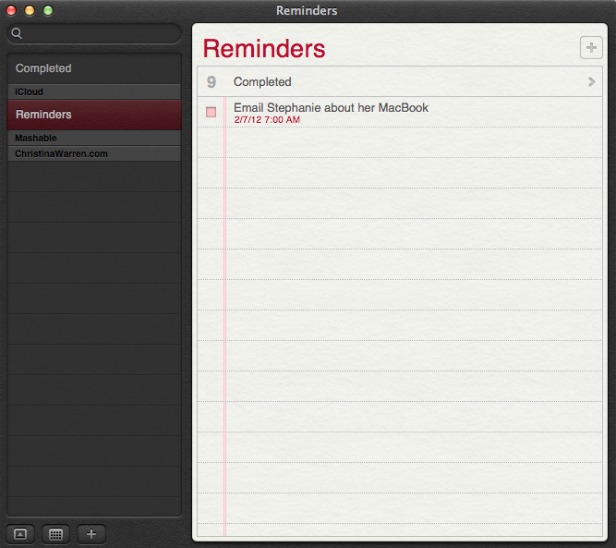
The Reminders app that appeared with iOS 5 now has a Mac version, and it syncs across all your iOS devices via iCloud. The app lets you make a lists within tasks, and you can set alerts, too -- just like on iOS. One thing missing in the Mac version, though: the ability to set an a location-based alert, reminding you to do something when you arrive at or leave a place. You'll still need an iPhone or iPad to create those.


9. Notes
Like Reminders, Notes now gets an Mac version, with some special abilities. The app is compatible with rich text, letting you add photos, movies and bulleted lists to your notes. Plus you can treat them like Post-It notes, sticking individual notes to your screen so they always appear "on top" of your apps. Like reminders, Notes get the iCloud-syncing treatment across all your iOS devices.


10. Contacts
In Mountain Lion, Contacts replaces the Mac Address Book app, another sign of bringing the OS X experience with iOS.


11. Safari Tweaks
Apple's web browser gets a makeover with Mountain Lion, with many of the changes clearly influenced by the rapidly rising Google Chrome. The biggest change: the address bar and search field get combined into an "omnibox." Also, the Reader button becomes much more prominent, and Safari is finally ditching the "http://" -- just the URL is visible in casual browsing. Finally, you can now sync Safari tabs across devices via iCloud.


12. Gatekeeper
Apple has introduced a new way to protect your Mac from malware, called Gatekeeper. With Gatekeeper, you choose in your System Prefs the level of protection you want: whether to install and run apps from the Mac App Store only, from the store and trusted developers (vetted by Apple) or from anyone. Control-clicking will let you override your settings temporarily.


13. Apple ♥ China
Apple's business is booming in China (iPad trademark legal battles notwithstanding), and it clearly wants to make its products as Sino-friendly as possible. Mail, Contacts and Calendar all work with some of the top Chinese online services, including Baidu. Share Sheets for Chinese users will include China-based video-sharing websites and blogging services, and there are some improvements to basic text input as well.


14. Software Update Changes
Now clicking on Software Update will bring you right to the Mac App Store, and if there's new software available, you'll get a message in your Notification Center. Apple wants its App Store to be the primary way Mac users get software, and this is a sign that the company is eating its own dog food in that sense.


15. Just Call It "OS X"
It's a semantic change, but it worth noting that Apple has ditched the "Mac" part of "Mac OS X" when it refers to the new OS. Could that be a sign of an even deeper marrying of its desktop software with iOS down the road? Stay tuned.

[Source:Mashable]

Apple WWDC 2012 live update

Finally on 11 June 2012 Apple kicked off it's World Wide Developers' Conference (WWDC) event. New updates regarding to all Apple products will be unveiled. Event will be held till 15 Jun @ Moscone Center, San Francisco. First day was of software and unveiled new features of iOS6, Mac OS X 8.0 Mountain Lion, Macbooks and Apple Maps etc.


And following is a slideshow displaying major photos of First day of the event.


Wednesday, March 21, 2012

It is Twitter's 6th birthday

Twitter is celebrating its sixth birthday today. The sheer fact that you can understand that sentence shows you how far Twitter has gone since then. It has become the de facto short message system of the internet and the favorite social networking service of celebrities all around the world.
And, with over 500 million users, it is the largest one-to-many open communication platform on the web.It wasn't long before its public debut on July 15 as Twitter and since then the service's popularity has exploded.
Today Twitter has an estimated 350 million registered users, with about 100 million of them posting regularly on the site in 2011. The service has attracted numerous celebrities, politicians, brands, and influencers from all fields to the platform. Depending on who you ask (or follow), you'll find that Twitter can be used to comment on the mundane, for personal micro-blogging, as a promotional tool, an RSS reader replacement, or to learn about current events in real time.
Here are some quick facts about Twitter gathered from around the web:
  • Born from a 5-member team, Twitter is now available in 28 languages and employs over 835 people.
  • Over 60 billion tweets were sent out in all of 2011.
  • 1 million Twitter accounts are opened every day
  • The record for maximum tweets per second as of date is 12233, set during Superbowl 2012.
  • It took 3 years, 2 months and 1 day to hit the first billion tweets. Now it takes less than a week.
  • A 2011 study from the University of Washington says Twitter and other social media sites played a central role leading up to the toppling of the Tunisian and Egyptian dictators.
  • Lady Gaga (@LadyGaga) has over 21 million followers on Twitter, making her the most "followed" user. Barack Obama (@BarackObama) is by the most popular politician on Twitter with over 13 million followers, while YouTube (@YouTube) is the most popular brand on Twitter with 10 million followers.

[Source: Mashable and Techspot]

Wednesday, February 22, 2012

Twitter got Appdated

Twitter announced updates to its iPhone and Android apps on Tuesday, re-introducing some well-loved features and adding new improvements as well. But the updates don’t impact all mobile tweeters equally.
Both updated apps bring back the swipe shortcut. That move allows users to reply to, favorite and share tweets — as well as retweet posts and view other user profiles — all without leaving their own timelines. The updated iPhone and Android apps also both introduce a feature designed to expedite the process of finding friends on Twitter via existing email and phone contact lists.
The Android update optimizes Twitter to run on the Ice Cream Sandwich version of the platform, as well as on Amazon’s Kindle Fire tablet and Barnes & Noble’s Nook and Nook Color tablets.
People who use Twitter from their iPhones will see the most changes, though. The company has returned the ability to press and hold text to copy the body of tweets and user profiles. And a new read-it-later option now saves links within tweets for delayed gratification. To activate the “Read Later Service” option, go to the Settings menu and click Advanced. That option will join choices to tweet, copy or email links via the Twitter mobile app’s sharing feature.
For iPhone users, Twitter has also updated the design of the direct messages section and brought back the ability to mark all messages as unread by tapping a checkmark in the lower righthand corner. iPhone owners can change their font size, too.