Monday, June 18, 2012

Microsoft Surface: A new dimension


The star of Microsoft’s mystery Monday unveiling has been revealed: Surface, a Windows tablet.
“It was always clear that what our software could do would require us to push hardware, sometimes where our partners hadn’t envisioned,” Microsoft CEO Steve Ballmer said at the event. “Much like Windows 1 needed the mouse, we wanted to give Windows 8 its own hardware.” Just as Windows 8 is a re-imagining of the Windows operating system, Microsoft describes Surface as a re-imagining of the tablet.
The first of its kind, Surface is designed to work as both tablet and PC and comes in a version running Windows RT as well as a version running Windows 8 Pro.
Super-thin, the tablet is just 9.3mm thin for the Windows RT version and 13.5mm for the Pro version. Both have two full size USB ports. You’ll also find a Micro SD port on the side of the RT version and a microSDXC port of the Pro version for adding data to the device or reading files (like pictures from your digital camera) on the fly.
Surface has a 10.6-inch 16:9 widescreen HD display screen. Designed to be mobile yet sturdy, the screen is made of Gorilla Glass -– an ultra-strong glass – to prevent scratches and breaks if it takes a tumble. A built-in kickstand on the rear of the tablet holds it up while you’re typing or viewing videos.
A Touch Cover for the device protects the screen, and much like Apple’s Smart Cover does with the iPad, it connects to Surface via magnets on the device’s side. A stylus also comes with the Pro version, and attaches to the side of the tablet for easy storage.
Both versions of the tablet have 2×2 MIMO antennae. The RT version has a Micro HD Video port while the Pro version has a Mini DisplayPort Video. Surface running Windows RT will be available in 32 GB and 64GB sizes, while Surface running Windows 8 Pro will be available in 64 GB and 128 GB sizes. While no pricing was announced, Microsoft says the tablets will be “priced to competitive rates with ARM tablets.”
Surface for Windows RT tablet
  • Processor: NVIDIA Tegra-based ARM chip
  • Weight: 676 grams
  • Thickness: 9.3 millimeters
  • Display: 10.6-inch ClearType HD capactive touchpanel
  • Battery: 31.5Wh
  • I/O: microSD, USB 2.0, Micro HD Video, 2x2 MIMO antennae
  • Software: Windows RT + Office Home & Student 2013 RT
  • Accessories: Touch Cover, Type Cover, VaporMg Case & Stand
  • Capacity: 32GB / 64GB
  • Availability: "Around" the Windows 8 launch (fall 2012)
  • Pricing: To be determined
Surface for Windows 8 Pro tablet
  • Processor: Intel Core i5 (Ivy Bridge)
  • Weight: 903 grams
  • Thickness: 13.5 millimeters
  • Display: 10.6-inch ClearType Full HD (1080p) capactive touchpanel
  • Battery: 42Wh
  • I/O: microSDXC, USB 3.0, Mini DisplayPort, 2x2 MIMO antennae
  • Software: Windows 8 Pro
  • Accessories: Touch Cover, Type Cover, VaporMg Case & Stand, Pen with Palm Block
  • Capacity: 64GB / 128GB
  • Availability: "Three months after" the Windows 8 launch this fall
  • Pricing: To be determined


Photo gallery


Watch video


Monday, June 11, 2012

Comparison between Google and Apple Maps


Google Maps has been available on the iPhone since the device’s launch, but on Monday Apple announced its own version of Maps for iOS 6 — one that will be replace the Google service on its smartphones.
Google recently announced an update to its mapping service as well. While both services certainly have a lot in common, there are also quite a few distinctive differences between the two.
A comparison between Apple maps and Google Maps

Traffic

Both Google Maps and Apple's Maps can give you traffic information as well as general directions.
Apple's Maps will also use crowd-sourced information on accidents, allowing you to better see potential slow downs before they slow you down.


Routing

Both maps will be able to give you driving and walking directions.
Apple Maps, however, will not offer public transportation maps at launch, unlike its Google counterpart.


Local Search

Apple's Maps offers a local search function that allows you to look up local restaurants and businesses.
While you can also look up restaurants using Google Maps, Apple's Maps will integrate in Yelp information, allowing you to check out restaurants by rating and read reviews.


Local search

Searches for local restaurants and businesses in Apple's Maps will show not only the business, but also its Yelp rating and reviews.


[Source: Mashable]

Mac OS X Mountain Lion 15 new features

Apple announced on Monday during its 23rd annual Worldwide Developers Conference that OS X Mountain Lion, the latest upgrade to its core Mac software, will be getting a series of enhancements.
Apple exec Craig Federrichi demoed various Mountain Lion features for attendees, highlighting Siri-like dictation, a Power Nap feature which updates your streams while the Mac sleeps and a tabview feature associated with the Safari browser, which allows you to zoom in and out. It will also get deeper integration with iCloud.
Mountain Lion will ship in July and cost $19.99. It will also serve as an upgrade to Snow Leopard.

Apple OS X Mountain Lion: 15 New Features

1. Deeper Integration With iCloud

Today, Apple's iCloud technology syncs media (music, photos) and some data among iPhones, iPads, iPod Touches and to a limited extent Macs. With OS X Mountain Lion, iCloud plays a greater role on the Mac side, syncing calendars, contacts and email across all your devices. iCloud syncing comes to a host more apps, including Messages, Notes and Reminders (more on those in a bit). As iCloud and the Mac evolve, Apple's vision of a unified experience across all devices is becoming clearer.


2. Messages Replaces iChat
With iOS 5, Apple introduced iMessage for its mobile devices, which emulated BlackBerry Messenger's ability to send messages either as text messages or pure data. Now iMessage gets a desktop friend: Messages, which replaces iChat and acts as an instant-messaging app (for accounts on AIM, Google Chat and others) that's iMessage-friendly. You can easily send photos and videos via messages, and you can launch FaceTime from the app, too. It's as yet unclear how it'll handle text messages sent to specific phone numbers, but it's another step toward a unified chat experience.


3. Notification Center
Notifications got a huge upgrade with iOS 5, so it only makes sense that similar technology makes an appearance on Mountain Lion. Notifications will have a unified look, popping up in the top right of the screen (no option to customize the location) and going away quickly. Sliding two fingers to the side on your trackpad will open up your notifications list on the right side of the screen, which looks almost exactly the same as its cousin on iOS.


4. Share Fast, Share Often
Apple has added a Share button to its apps, which it calls Share Sheets. Now when you're in Safari, you can quickly send a link. Same with photos from iPhoto (and Photo Booth!). There's also an option to add location. Tellingly, Twitter is an ubiquitous option while Facebook sharing has only been added to QuickTime.


5. Twitter, Twitter Everywhere
Twitter integration is now at the OS level with Mountain Lion, and logging in once from you System Preferences enables sharing across all apps. Share options for Twitter are built into almost all Apple apps, and any @replies and mentions you get will pop up as notifications.


6. Game Center
The iOS Game Center comes to the Mac, bringing with it leaderboards, game discovery from friends and even multiplayer gameplay. That's right, with Mountain Lion you'll be able to play games on your Mac with your friends in iOS devices, in real time. That is, as long as there's a Mac version -- good thing Apple is releasing the Game Kit tool to make it easier for developers to creat Mac games that play nice with Game Center.


7. AirPlay Mirroring
Apple AirPlay lets you wirelessly stream music and videos to any AirPlay-compatible device, which includes Apple TV. That means iPads and iPhones can stream video to a TV screen via Apple TV, and now Macs get added to that list with Mountain Lion. On the Mac, AirPlay mirroring can send whatever's on your screen to a TV set connected to an Apple TV (at 720p resolution), giving those videos and presentations room to stretch out.


8. Reminders
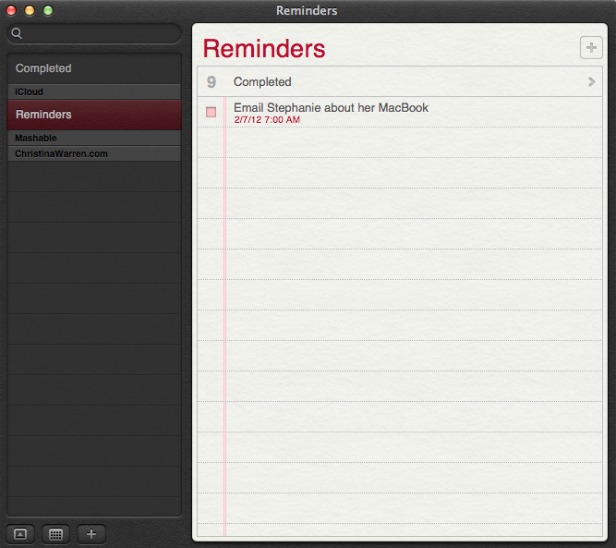
The Reminders app that appeared with iOS 5 now has a Mac version, and it syncs across all your iOS devices via iCloud. The app lets you make a lists within tasks, and you can set alerts, too -- just like on iOS. One thing missing in the Mac version, though: the ability to set an a location-based alert, reminding you to do something when you arrive at or leave a place. You'll still need an iPhone or iPad to create those.


9. Notes
Like Reminders, Notes now gets an Mac version, with some special abilities. The app is compatible with rich text, letting you add photos, movies and bulleted lists to your notes. Plus you can treat them like Post-It notes, sticking individual notes to your screen so they always appear "on top" of your apps. Like reminders, Notes get the iCloud-syncing treatment across all your iOS devices.


10. Contacts
In Mountain Lion, Contacts replaces the Mac Address Book app, another sign of bringing the OS X experience with iOS.


11. Safari Tweaks
Apple's web browser gets a makeover with Mountain Lion, with many of the changes clearly influenced by the rapidly rising Google Chrome. The biggest change: the address bar and search field get combined into an "omnibox." Also, the Reader button becomes much more prominent, and Safari is finally ditching the "http://" -- just the URL is visible in casual browsing. Finally, you can now sync Safari tabs across devices via iCloud.


12. Gatekeeper
Apple has introduced a new way to protect your Mac from malware, called Gatekeeper. With Gatekeeper, you choose in your System Prefs the level of protection you want: whether to install and run apps from the Mac App Store only, from the store and trusted developers (vetted by Apple) or from anyone. Control-clicking will let you override your settings temporarily.


13. Apple ♥ China
Apple's business is booming in China (iPad trademark legal battles notwithstanding), and it clearly wants to make its products as Sino-friendly as possible. Mail, Contacts and Calendar all work with some of the top Chinese online services, including Baidu. Share Sheets for Chinese users will include China-based video-sharing websites and blogging services, and there are some improvements to basic text input as well.


14. Software Update Changes
Now clicking on Software Update will bring you right to the Mac App Store, and if there's new software available, you'll get a message in your Notification Center. Apple wants its App Store to be the primary way Mac users get software, and this is a sign that the company is eating its own dog food in that sense.


15. Just Call It "OS X"
It's a semantic change, but it worth noting that Apple has ditched the "Mac" part of "Mac OS X" when it refers to the new OS. Could that be a sign of an even deeper marrying of its desktop software with iOS down the road? Stay tuned.

[Source:Mashable]

Apple WWDC 2012 live update

Finally on 11 June 2012 Apple kicked off it's World Wide Developers' Conference (WWDC) event. New updates regarding to all Apple products will be unveiled. Event will be held till 15 Jun @ Moscone Center, San Francisco. First day was of software and unveiled new features of iOS6, Mac OS X 8.0 Mountain Lion, Macbooks and Apple Maps etc.


And following is a slideshow displaying major photos of First day of the event.


Friday, June 8, 2012

Apple iMove self driven car

And here are some pics of Apple's iMove: a self driven concept car that may change the rules of Automobile industry. Click on each image to get full view.


Facebook App center

A place to find great apps


For the over 900 million people that use Facebook, the App Center is the central place to find great social apps. Everything has an app detail page, which helps people see what makes an app unique and lets them install it before going to an app.

App detail pages help people understand what makes an app unique, see screenshots of the experience, and login to start using the app. After a user authenticates from an app detail page, they’ll be sent directly into the app.

Growth for high-quality apps

Success through the App Center is tied to the quality of an app. We use a variety of signals, such as user ratings and engagement, to determine if an app is listed in the App Center. To help you monitor user feedback, we provide an app ratings metric in Insightsto report how users rate your app over time.

Well-designed apps that people enjoy will be prominently displayed. Apps that receive poor user ratings or don’t meet the quality guidelines won't be listed.

Driving mobile installs

The App Center is designed to grow mobile apps that use Facebook – whether they’re on iOSAndroid or the mobile web. From the mobile App Center, users can browse apps that are compatible with their device, and if a mobile app requires installation, they will be sent to download the app from the App Store or Google Play.


[Source: Facebook]

Thursday, June 7, 2012

What will be new in iOS 6

As is always the case with every Apple event, there's really no way we can know what the company will announce at the Apple Worldwide Developers Conference keynote next Monday, June 11.  Apple is set to show off its latest mobile operating system next week, iOS 6. According to reports, Apple will focus primarily on major improvements to apps, while most functions of iOS will remain unchanged. iPad 3 owners will be happy to know that Siri is expected to launch on their devices with the release of iOS 6. So what does iOS 6 have in store for the rest of us?


  • Camera and Photos App Upgrades
    Perhaps to dovetail with expected iPhone 5 camera improvements, Apple will make significant changes to iOS 6 default Camera and Photos apps. Not only will videos synchronize with iCloud, but photo sharing and social networking functionality will be added to the apps. Apple will also add Facebook sharing functions directly into the apps for easy posting to friends.
  • Do Not Disturb
    Notifications will feature a simple toggle to indicate the iOS user does not want to be bothered. This is different from silencing the device or entering Airplane Mode. A do not disturb switch could hide all incoming notifications and cut off sounds until a later time, after the user switches the mode off to catch up.
  • Facebook Integration
    System-wide Facebook integration was rumored in previous versions of iOS, but now the addition is confirmed for iOS 6. Apple has made a deal with Facebook to add the social networking service to iOS much like Twitter came to us in iOS 5. Expect similar functionality, with Facebook features starting small and ramping up over time.
  • Google Maps Replaced by Apple 3D Maps
    Believe it or not, Apple is ditching Google Maps with iOS 6 and replacing the Maps app with its own mapping software developed in-house. These maps include fully 3D renderings of places and may even include turn-by-turn navigation instructions. The new Maps is certain to be a major focus of Apple's demos at WWDC next week.
  • Mail VIPs
    Several Mail app improvements are coming your way. Most notable is an iCloud-synced list of VIPs that would screen your email automatically. Messages coming from a VIP will be starred so they can be easily found among other incoming mail.
  • Redesigned Stores
    The App Store, iBookstore and iTunes Stores will all get redesigns. Besides Facebook integration coming to the iTunes Store, other social features will accomodate content sharing and interaction across the board. The new designs are also intended to improve the purchasing experience, and are expected to land on Apple's Mac OS X stores after the iOS 6 launch.
  • Safari iCloud Tabs Support / Omnibar
    Mobile Safari web browsing will get more convenient, with an iCloud Tabs button provided on iOS 6 devices. Clicking the button will sync your browser tabs to iCloud, so they can be picked up later on another mobile device or a Mac OS X computer. Also, Safari will get an all-in-one search/address bar just like Chrome. Pretty handy.
  • Siri Improvements
    Apple is always working to make Siri better, but there have been sporadic reports that the company plans to allow third-party app developers to interact with Siri's servers. This could provide a whole new take on what makes Siri useful with new apps across the board. Although this feature is not certain, we can be sure Apple will improve Siri beyond simply letting iPad 3 owners in on the fun.